数据分析-IgG介导的食物不耐受与人连蛋白关联性分析

数据分析
生物
Author

AndyBourne

单元格 1:环境配置与库导入

# -*- coding: utf-8 -*-
"""
IgG介导的食物不耐受与人连蛋白关联性分析 - Jupyter Notebook版
数据路径:/Users/wangguotao/Downloads/ISAR/food/
"""

# 安装依赖(首次运行时取消注释执行,执行一次即可)
# !pip install pandas numpy matplotlib scipy statsmodels openpyxl

# 导入所需库
import pandas as pd
import numpy as np
import matplotlib.pyplot as plt
from scipy.stats import pearsonr, spearmanr
import statsmodels.api as sm
import statsmodels.formula.api as smf
from openpyxl import Workbook
import warnings
warnings.filterwarnings('ignore')

# 设置中文字体(解决Jupyter中图表中文乱码问题)
plt.rcParams['font.sans-serif'] = ['WenQuanYi Zen Hei', 'SimHei', 'Arial Unicode MS']
plt.rcParams['axes.unicode_minus'] = False

# 配置文件路径(适配你的本地路径)
MAIN_DATA_PATH = "/Users/wangguotao/Downloads/ISAR/food/信息汇总全_加阳性率+加权+二分类+3种食物加.xlsx"
FATIGUE_DATA_PATH = "/Users/wangguotao/Downloads/ISAR/food/疲劳量表.xls"
OUTPUT_DIR = "/Users/wangguotao/Downloads/ISAR/food/"

print("✅ 环境配置完成,库导入成功!")
✅ 环境配置完成,库导入成功!

单元格 2:数据加载函数

def load_data(main_path, fatigue_path):
    """加载主数据和疲劳量表数据(主数据为核心分析用)"""
    # 加载主数据
    try:
        df_main = pd.read_excel(main_path)
        print(f"✅ 成功加载主数据:{main_path}")
        print(f"主数据形状:{df_main.shape}(行×列)")
    except Exception as e:
        print(f"❌ 主数据加载失败:{str(e)}")
        return None, None
    
    # 加载疲劳量表(备用,不影响核心分析)
    try:
        df_fatigue = pd.read_excel(fatigue_path)
        print(f"✅ 成功加载疲劳量表:{fatigue_path}")
        print(f"疲劳量表形状:{df_fatigue.shape}(行×列)")
    except Exception as e:
        print(f"⚠️  疲劳量表加载失败:{str(e)}(不影响核心分析)")
        df_fatigue = None
    
    # 显示核心变量
    key_vars = [col for col in df_main.columns if any(x in col for x in 
                ['性别', '年龄', '婚姻', '身高', '体重', '人连蛋白', '三种食物'])]
    print(f"\n核心分析变量(共{len(key_vars)}个):")
    for i, var in enumerate(key_vars, 1):
        print(f"  {i:2d}. {var}")
    
    return df_main, df_fatigue

# 执行数据加载
df_main, df_fatigue = load_data(MAIN_DATA_PATH, FATIGUE_DATA_PATH)
✅ 成功加载主数据:/Users/wangguotao/Downloads/ISAR/food/信息汇总全_加阳性率+加权+二分类+3种食物加.xlsx
主数据形状:(102, 30)(行×列)
✅ 成功加载疲劳量表:/Users/wangguotao/Downloads/ISAR/food/疲劳量表.xls
疲劳量表形状:(102, 11)(行×列)

核心分析变量(共10个):
   1. 性别
   2. 年龄
   3. 婚姻
   4. 身高
   5. 体重
   6. 人连蛋白四参数结果
   7. 人连蛋白直线结果
   8. 人连蛋白四参数结果.1
   9. 人连蛋白直线结果.1
  10. 三种食物分类加权评分

单元格 3:数据清洗与预处理

def clean_and_preprocess(df):
    """数据清洗:处理缺失值、创建分层变量、编码变量"""
    df_work = df.copy()
    
    # 1. 清理性别(仅保留男/女)
    df_work['性别_clean'] = df_work['性别'].apply(lambda x: x if x in ['男', '女'] else np.nan)
    
    # 2. 清理婚姻状况(统一格式)
    df_work['婚姻_clean'] = df_work['婚姻'].replace('已婚·', '已婚')
    valid_marriage = ['已婚', '未婚', '离异']
    df_work['婚姻_clean'] = df_work['婚姻_clean'].apply(lambda x: x if x in valid_marriage else np.nan)
    
    # 3. 计算BMI及分类(中国标准)
    df_work = df_work.dropna(subset=['身高', '体重'])  # 删除身高体重缺失值
    df_work['BMI'] = df_work['体重'] / ((df_work['身高'] / 100) ** 2)
    
    def bmi_category(bmi):
        if pd.isna(bmi):
            return np.nan
        elif bmi < 18.5:
            return '偏瘦'
        elif 18.5 <= bmi < 24:
            return '正常'
        elif 24 <= bmi < 28:
            return '超重'
        else:
            return '肥胖'
    
    df_work['BMI分类'] = df_work['BMI'].apply(bmi_category)
    df_work['BMI分类合并'] = df_work['BMI分类'].replace({'偏瘦': '正常'})  # 合并小样本组
    
    # 4. 年龄分层(临床常用分组)
    age_bins = [0, 35, 45, 55, 100]
    age_labels = ['≤35岁', '36-45岁', '46-55岁', '>55岁']
    df_work['年龄分层'] = pd.cut(df_work['年龄'], bins=age_bins, labels=age_labels, right=False)
    
    # 5. 选择核心变量并去重
    core_vars = [
        '性别_clean', '年龄分层', 'BMI分类', 'BMI分类合并', '婚姻_clean',
        '三种食物分类加权评分', '人连蛋白四参数结果.1', '是否耐受'
    ]
    df_clean = df_work[core_vars].dropna()
    
    # 6. 创建回归编码变量
    df_clean['性别编码'] = df_clean['性别_clean'].map({'男': 1, '女': 0})
    df_clean['年龄连续'] = df_clean['年龄分层'].map({'≤35岁': 30, '36-45岁': 40, '46-55岁': 50, '>55岁': 60})
    df_clean['BMI编码'] = df_clean['BMI分类合并'].map({'正常': 1, '超重': 2, '肥胖': 3})
    
    # 打印清洗结果
    print(f"\n📊 数据清洗结果:")
    print(f"原始样本量:{len(df)}例 → 有效样本量:{len(df_clean)}例")
    print(f"各分层变量分布:")
    print(f"  性别:{df_clean['性别_clean'].value_counts().to_dict()}")
    print(f"  年龄分层:{df_clean['年龄分层'].value_counts().to_dict()}")
    print(f"  BMI分类:{df_clean['BMI分类合并'].value_counts().to_dict()}")
    print(f"  婚姻状况:{df_clean['婚姻_clean'].value_counts().to_dict()}")
    
    # 保存清洗后数据
    clean_path = f"{OUTPUT_DIR}cleaned_analysis_data.csv"
    df_clean.to_csv(clean_path, index=False, encoding='utf-8-sig')
    print(f"\n💾 清洗后数据已保存:{clean_path}")
    
    return df_clean

# 执行数据清洗
if df_main is not None:
    df_clean = clean_and_preprocess(df_main)
else:
    print("❌ 主数据加载失败,无法进行数据清洗")

📊 数据清洗结果:
原始样本量:102例 → 有效样本量:91例
各分层变量分布:
  性别:{'男': 71, '女': 20}
  年龄分层:{'36-45岁': 31, '46-55岁': 29, '≤35岁': 25, '>55岁': 6}
  BMI分类:{'超重': 37, '正常': 32, '肥胖': 22}
  婚姻状况:{'已婚': 76, '未婚': 12, '离异': 3}

💾 清洗后数据已保存:/Users/wangguotao/Downloads/ISAR/food/cleaned_analysis_data.csv

单元格 4:分层分析核心函数

def stratified_analysis(df, strat_var):
    """分层分析:计算相关系数、线性回归及显著性"""
    results = {}
    groups = df.groupby(strat_var)
    # 分层变量中文名称映射
    strat_cn = {
        '性别_clean': '性别', '年龄分层': '年龄', 
        'BMI分类合并': 'BMI', '婚姻_clean': '婚姻状况'
    }[strat_var]
    
    print(f"\n" + "="*60)
    print(f"🔍 {strat_cn}分层分析结果")
    print("="*60)
    
    for group_name, group_data in groups:
        if len(group_data) < 3:  # 样本量<3例跳过
            results[str(group_name)] = {'样本量': len(group_data), '状态': '样本量不足'}
            print(f"【{group_name}】样本量{len(group_data)}例,跳过分析")
            continue
        
        # 相关分析(Pearson+Spearman)
        pearson_r, pearson_p = pearsonr(
            group_data['三种食物分类加权评分'], 
            group_data['人连蛋白四参数结果.1']
        )
        spearman_r, spearman_p = spearmanr(
            group_data['三种食物分类加权评分'], 
            group_data['人连蛋白四参数结果.1']
        )
        
        # 线性回归
        model = smf.ols(
            "Q('人连蛋白四参数结果.1') ~ Q('三种食物分类加权评分')", 
            data=group_data
        ).fit()
        beta, beta_se, beta_p = model.params[1], model.bse[1], model.pvalues[1]
        r2 = model.rsquared
        
        # 结果存储与打印
        results[str(group_name)] = {
            '样本量': len(group_data), 'Pearson_r': pearson_r, 'Pearson_p': pearson_p,
            'Spearman_r': spearman_r, 'Spearman_p': spearman_p,
            'beta': beta, 'beta_se': beta_se, 'beta_p': beta_p, 'R2': r2
        }
        
        print(f"\n{group_name}】(样本量:{len(group_data)}例)")
        print(f"  相关分析:")
        print(f"    Pearson:r={pearson_r:.4f},p={pearson_p:.4f}")
        print(f"    Spearman:ρ={spearman_r:.4f},p={spearman_p:.4f}")
        print(f"  线性回归:")
        print(f"    β={beta:.4f}(SE={beta_se:.4f}),p={beta_p:.4f},R²={r2:.4f}")
        if pearson_p < 0.05 or spearman_p < 0.05:
            print(f"  ⚠️  存在显著相关性(p<0.05)")
    
    return results

# 执行分层分析
if 'df_clean' in locals():
    # 性别分层分析
    gender_res = stratified_analysis(df_clean, '性别_clean')
    
    # 年龄分层分析
    age_res = stratified_analysis(df_clean, '年龄分层')
    
    # BMI分层分析
    bmi_res = stratified_analysis(df_clean, 'BMI分类合并')
    
    # 婚姻状况分层分析
    marriage_res = stratified_analysis(df_clean, '婚姻_clean')
else:
    print("❌ 清洗后数据不存在,无法进行分层分析")

============================================================
🔍 性别分层分析结果
============================================================

【女】(样本量:20例)
  相关分析:
    Pearson:r=0.1493,p=0.5298
    Spearman:ρ=0.2214,p=0.3482
  线性回归:
    β=21.1880(SE=33.0746),p=0.5298,R²=0.0223

【男】(样本量:71例)
  相关分析:
    Pearson:r=-0.1814,p=0.1300
    Spearman:ρ=-0.1003,p=0.4053
  线性回归:
    β=-40.2186(SE=26.2477),p=0.1300,R²=0.0329

============================================================
🔍 年龄分层分析结果
============================================================

【≤35岁】(样本量:25例)
  相关分析:
    Pearson:r=0.0511,p=0.8084
    Spearman:ρ=0.0567,p=0.7877
  线性回归:
    β=9.3043(SE=37.9301),p=0.8084,R²=0.0026

【36-45岁】(样本量:31例)
  相关分析:
    Pearson:r=0.2780,p=0.1299
    Spearman:ρ=0.4193,p=0.0189
  线性回归:
    β=30.6741(SE=19.6785),p=0.1299,R²=0.0773
  ⚠️  存在显著相关性(p<0.05)

【46-55岁】(样本量:29例)
  相关分析:
    Pearson:r=-0.2978,p=0.1167
    Spearman:ρ=-0.6374,p=0.0002
  线性回归:
    β=-80.5820(SE=49.7132),p=0.1167,R²=0.0887
  ⚠️  存在显著相关性(p<0.05)

【>55岁】(样本量:6例)
  相关分析:
    Pearson:r=0.1592,p=0.7632
    Spearman:ρ=0.1309,p=0.8047
  线性回归:
    β=17.3894(SE=53.9203),p=0.7632,R²=0.0253

============================================================
🔍 BMI分层分析结果
============================================================

【正常】(样本量:32例)
  相关分析:
    Pearson:r=0.0968,p=0.5980
    Spearman:ρ=0.1170,p=0.5237
  线性回归:
    β=19.5630(SE=36.7118),p=0.5980,R²=0.0094

【肥胖】(样本量:22例)
  相关分析:
    Pearson:r=-0.1735,p=0.4401
    Spearman:ρ=-0.0534,p=0.8134
  线性回归:
    β=-44.6750(SE=56.7156),p=0.4401,R²=0.0301

【超重】(样本量:37例)
  相关分析:
    Pearson:r=-0.2009,p=0.2331
    Spearman:ρ=-0.2019,p=0.2307
  线性回归:
    β=-34.1264(SE=28.1246),p=0.2331,R²=0.0404

============================================================
🔍 婚姻状况分层分析结果
============================================================

【已婚】(样本量:76例)
  相关分析:
    Pearson:r=-0.1212,p=0.2971
    Spearman:ρ=-0.0774,p=0.5061
  线性回归:
    β=-24.3615(SE=23.1985),p=0.2971,R²=0.0147

【未婚】(样本量:12例)
  相关分析:
    Pearson:r=-0.3341,p=0.2885
    Spearman:ρ=0.0521,p=0.8721
  线性回归:
    β=-136.2899(SE=121.5802),p=0.2885,R²=0.1116

【离异】(样本量:3例)
  相关分析:
    Pearson:r=0.8532,p=0.3493
    Spearman:ρ=0.8660,p=0.3333
  线性回归:
    β=18.3934(SE=11.2432),p=0.3493,R²=0.7280

单元格 5:交互作用检验

def clean_and_preprocess(df):
    """数据清洗:处理缺失值、创建分层变量、编码变量"""
    df_work = df.copy()
    
    # 1. 清理性别(仅保留男/女)
    df_work['性别_clean'] = df_work['性别'].apply(lambda x: x if x in ['男', '女'] else np.nan)
    
    # 2. 清理婚姻状况(统一格式)
    df_work['婚姻_clean'] = df_work['婚姻'].replace('已婚·', '已婚')
    valid_marriage = ['已婚', '未婚', '离异']
    df_work['婚姻_clean'] = df_work['婚姻_clean'].apply(lambda x: x if x in valid_marriage else np.nan)
    
    # 3. 计算BMI及分类(中国标准)
    df_work = df_work.dropna(subset=['身高', '体重'])  # 删除身高体重缺失值
    df_work['BMI'] = df_work['体重'] / ((df_work['身高'] / 100) ** 2)
    
    def bmi_category(bmi):
        if pd.isna(bmi):
            return np.nan
        elif bmi < 18.5:
            return '偏瘦'
        elif 18.5 <= bmi < 24:
            return '正常'
        elif 24 <= bmi < 28:
            return '超重'
        else:
            return '肥胖'
    
    df_work['BMI分类'] = df_work['BMI'].apply(bmi_category)
    df_work['BMI分类合并'] = df_work['BMI分类'].replace({'偏瘦': '正常'})  # 合并小样本组
    
    # 4. 年龄分层(临床常用分组)
    age_bins = [0, 35, 45, 55, 100]
    age_labels = ['≤35岁', '36-45岁', '46-55岁', '>55岁']
    df_work['年龄分层'] = pd.cut(df_work['年龄'], bins=age_bins, labels=age_labels, right=False)
    
    # 5. 选择核心变量并去重
    core_vars = [
        '性别_clean', '年龄分层', 'BMI分类', 'BMI分类合并', '婚姻_clean',
        '三种食物分类加权评分', '人连蛋白四参数结果.1', '是否耐受', '年龄'  # 新增原始年龄字段
    ]
    df_clean = df_work[core_vars].dropna()
    
    # 6. 创建回归编码变量(关键修复:确保所有编码变量为数值型)
    df_clean['性别编码'] = df_clean['性别_clean'].map({'男': 1, '女': 0}).astype(float)
    
    # 修复:直接使用原始年龄作为连续变量,避免分类变量问题
    df_clean['年龄连续'] = df_clean['年龄'].astype(float)  # 改用原始年龄字段
    
    # 备用方案:如果仍想用分层映射值,需强制转换为数值型
    # age_map = {'≤35岁': 30.0, '36-45岁': 40.0, '46-55岁': 50.0, '>55岁': 60.0}
    # df_clean['年龄连续'] = df_clean['年龄分层'].map(age_map).astype(float)
    
    df_clean['BMI编码'] = df_clean['BMI分类合并'].map({'正常': 1.0, '超重': 2.0, '肥胖': 3.0}).astype(float)
    
    # 打印数据类型检查
    print("\n🔍 关键变量数据类型检查:")
    print(f"  三种食物分类加权评分: {df_clean['三种食物分类加权评分'].dtype}")
    print(f"  人连蛋白四参数结果.1: {df_clean['人连蛋白四参数结果.1'].dtype}")
    print(f"  性别编码: {df_clean['性别编码'].dtype}")
    print(f"  年龄连续: {df_clean['年龄连续'].dtype}")
    print(f"  BMI编码: {df_clean['BMI编码'].dtype}")
    
    # 打印清洗结果
    print(f"\n📊 数据清洗结果:")
    print(f"原始样本量:{len(df)}例 → 有效样本量:{len(df_clean)}例")
    print(f"各分层变量分布:")
    print(f"  性别:{df_clean['性别_clean'].value_counts().to_dict()}")
    print(f"  年龄分层:{df_clean['年龄分层'].value_counts().to_dict()}")
    print(f"  BMI分类:{df_clean['BMI分类合并'].value_counts().to_dict()}")
    print(f"  婚姻状况:{df_clean['婚姻_clean'].value_counts().to_dict()}")
    
    # 保存清洗后数据
    clean_path = f"{OUTPUT_DIR}cleaned_analysis_data.csv"
    df_clean.to_csv(clean_path, index=False, encoding='utf-8-sig')
    print(f"\n💾 清洗后数据已保存:{clean_path}")
    
    return df_clean

# 执行数据清洗
if df_main is not None:
    df_clean = clean_and_preprocess(df_main)
else:
    print("❌ 主数据加载失败,无法进行数据清洗")

🔍 关键变量数据类型检查:
  三种食物分类加权评分: float64
  人连蛋白四参数结果.1: float64
  性别编码: float64
  年龄连续: float64
  BMI编码: float64

📊 数据清洗结果:
原始样本量:102例 → 有效样本量:91例
各分层变量分布:
  性别:{'男': 71, '女': 20}
  年龄分层:{'36-45岁': 31, '46-55岁': 29, '≤35岁': 25, '>55岁': 6}
  BMI分类:{'超重': 37, '正常': 32, '肥胖': 22}
  婚姻状况:{'已婚': 76, '未婚': 12, '离异': 3}

💾 清洗后数据已保存:/Users/wangguotao/Downloads/ISAR/food/cleaned_analysis_data.csv

单元格 6:结果可视化

def stratified_analysis(df, strat_var):
    """分层分析:计算相关系数、线性回归及显著性"""
    results = {}
    groups = df.groupby(strat_var)
    # 分层变量中文名称映射
    strat_cn = {
        '性别_clean': '性别', '年龄分层': '年龄', 
        'BMI分类合并': 'BMI', '婚姻_clean': '婚姻状况'
    }[strat_var]
    
    print(f"\n" + "="*60)
    print(f"🔍 {strat_cn}分层分析结果")
    print("="*60)
    
    for group_name, group_data in groups:
        if len(group_data) < 3:  # 样本量<3例跳过
            results[str(group_name)] = {'样本量': len(group_data), '状态': '样本量不足'}
            print(f"【{group_name}】样本量{len(group_data)}例,跳过分析")
            continue
        
        # 相关分析(Pearson+Spearman)
        pearson_r, pearson_p = pearsonr(
            group_data['三种食物分类加权评分'], 
            group_data['人连蛋白四参数结果.1']
        )
        spearman_r, spearman_p = spearmanr(
            group_data['三种食物分类加权评分'], 
            group_data['人连蛋白四参数结果.1']
        )
        
        # 线性回归
        model = smf.ols(
            "Q('人连蛋白四参数结果.1') ~ Q('三种食物分类加权评分')", 
            data=group_data
        ).fit()
        beta, beta_se, beta_p = model.params[1], model.bse[1], model.pvalues[1]
        r2 = model.rsquared
        
        # 结果存储与打印
        results[str(group_name)] = {
            '样本量': len(group_data), 'Pearson_r': pearson_r, 'Pearson_p': pearson_p,
            'Spearman_r': spearman_r, 'Spearman_p': spearman_p,
            'beta': beta, 'beta_se': beta_se, 'beta_p': beta_p, 'R2': r2
        }
        
        print(f"\n{group_name}】(样本量:{len(group_data)}例)")
        print(f"  相关分析:")
        print(f"    Pearson:r={pearson_r:.4f},p={pearson_p:.4f}")
        print(f"    Spearman:ρ={spearman_r:.4f},p={spearman_p:.4f}")
        print(f"  线性回归:")
        print(f"    β={beta:.4f}(SE={beta_se:.4f}),p={beta_p:.4f},R²={r2:.4f}")
        if pearson_p < 0.05 or spearman_p < 0.05:
            print(f"  ⚠️  存在显著相关性(p<0.05)")
    
    return results

# 执行分层分析
if 'df_clean' in locals():
    # 性别分层分析
    gender_res = stratified_analysis(df_clean, '性别_clean')
    
    # 年龄分层分析
    age_res = stratified_analysis(df_clean, '年龄分层')
    
    # BMI分层分析
    bmi_res = stratified_analysis(df_clean, 'BMI分类合并')
    
    # 婚姻状况分层分析
    marriage_res = stratified_analysis(df_clean, '婚姻_clean')
else:
    print("❌ 清洗后数据不存在,无法进行分层分析")

============================================================
🔍 性别分层分析结果
============================================================

【女】(样本量:20例)
  相关分析:
    Pearson:r=0.1493,p=0.5298
    Spearman:ρ=0.2214,p=0.3482
  线性回归:
    β=21.1880(SE=33.0746),p=0.5298,R²=0.0223

【男】(样本量:71例)
  相关分析:
    Pearson:r=-0.1814,p=0.1300
    Spearman:ρ=-0.1003,p=0.4053
  线性回归:
    β=-40.2186(SE=26.2477),p=0.1300,R²=0.0329

============================================================
🔍 年龄分层分析结果
============================================================

【≤35岁】(样本量:25例)
  相关分析:
    Pearson:r=0.0511,p=0.8084
    Spearman:ρ=0.0567,p=0.7877
  线性回归:
    β=9.3043(SE=37.9301),p=0.8084,R²=0.0026

【36-45岁】(样本量:31例)
  相关分析:
    Pearson:r=0.2780,p=0.1299
    Spearman:ρ=0.4193,p=0.0189
  线性回归:
    β=30.6741(SE=19.6785),p=0.1299,R²=0.0773
  ⚠️  存在显著相关性(p<0.05)

【46-55岁】(样本量:29例)
  相关分析:
    Pearson:r=-0.2978,p=0.1167
    Spearman:ρ=-0.6374,p=0.0002
  线性回归:
    β=-80.5820(SE=49.7132),p=0.1167,R²=0.0887
  ⚠️  存在显著相关性(p<0.05)

【>55岁】(样本量:6例)
  相关分析:
    Pearson:r=0.1592,p=0.7632
    Spearman:ρ=0.1309,p=0.8047
  线性回归:
    β=17.3894(SE=53.9203),p=0.7632,R²=0.0253

============================================================
🔍 BMI分层分析结果
============================================================

【正常】(样本量:32例)
  相关分析:
    Pearson:r=0.0968,p=0.5980
    Spearman:ρ=0.1170,p=0.5237
  线性回归:
    β=19.5630(SE=36.7118),p=0.5980,R²=0.0094

【肥胖】(样本量:22例)
  相关分析:
    Pearson:r=-0.1735,p=0.4401
    Spearman:ρ=-0.0534,p=0.8134
  线性回归:
    β=-44.6750(SE=56.7156),p=0.4401,R²=0.0301

【超重】(样本量:37例)
  相关分析:
    Pearson:r=-0.2009,p=0.2331
    Spearman:ρ=-0.2019,p=0.2307
  线性回归:
    β=-34.1264(SE=28.1246),p=0.2331,R²=0.0404

============================================================
🔍 婚姻状况分层分析结果
============================================================

【已婚】(样本量:76例)
  相关分析:
    Pearson:r=-0.1212,p=0.2971
    Spearman:ρ=-0.0774,p=0.5061
  线性回归:
    β=-24.3615(SE=23.1985),p=0.2971,R²=0.0147

【未婚】(样本量:12例)
  相关分析:
    Pearson:r=-0.3341,p=0.2885
    Spearman:ρ=0.0521,p=0.8721
  线性回归:
    β=-136.2899(SE=121.5802),p=0.2885,R²=0.1116

【离异】(样本量:3例)
  相关分析:
    Pearson:r=0.8532,p=0.3493
    Spearman:ρ=0.8660,p=0.3333
  线性回归:
    β=18.3934(SE=11.2432),p=0.3493,R²=0.7280

单元格 7:结果汇总导出

def interaction_test(df):
    """交互作用检验:主效应模型 vs 交互效应模型"""
    print(f"\n" + "="*60)
    print("🔍 交互作用检验结果(IgG×性别/年龄/BMI)")
    print("="*60)
    
    # 数据类型二次检查与转换(双重保障)
    df_model = df.copy()
    
    # 确保核心变量为数值型
    numeric_cols = ['三种食物分类加权评分', '人连蛋白四参数结果.1', '性别编码', '年龄连续', 'BMI编码']
    for col in numeric_cols:
        df_model[col] = pd.to_numeric(df_model[col], errors='coerce')
    
    # 删除转换后仍有缺失值的行
    df_model = df_model.dropna(subset=numeric_cols)
    print(f"📝 交互分析有效样本量:{len(df_model)}例(剔除数值缺失行)")
    
    # 创建交互项(现在可以正常乘法运算)
    df_model['IgG_性别交互'] = df_model['三种食物分类加权评分'] * df_model['性别编码']
    df_model['IgG_年龄交互'] = df_model['三种食物分类加权评分'] * df_model['年龄连续']
    df_model['IgG_BMI交互'] = df_model['三种食物分类加权评分'] * df_model['BMI编码']
    
    # 构建模型
    # 模型1:主效应模型(无交互项)
    model1 = smf.ols(
        "Q('人连蛋白四参数结果.1') ~ Q('三种食物分类加权评分') + 性别编码 + 年龄连续 + BMI编码",
        data=df_model
    ).fit()
    
    # 模型2:交互效应模型(含交互项)
    model2 = smf.ols(
        "Q('人连蛋白四参数结果.1') ~ Q('三种食物分类加权评分') + 性别编码 + 年龄连续 + BMI编码 + "
        "IgG_性别交互 + IgG_年龄交互 + IgG_BMI交互",
        data=df_model
    ).fit()
    
    # 模型比较(ANOVA)
    anova_result = sm.stats.anova_lm(model1, model2)
    anova_f = anova_result['F'].iloc[1] if 'F' in anova_result.columns else np.nan
    anova_p = anova_result['Pr(>F)'].iloc[1] if 'Pr(>F)' in anova_result.columns else np.nan
    
    # 提取交互项参数
    interaction_params = {}
    for term, name in [
        ('IgG_性别交互', 'IgG×性别'), 
        ('IgG_年龄交互', 'IgG×年龄'), 
        ('IgG_BMI交互', 'IgG×BMI')
    ]:
        if term in model2.params.index:
            interaction_params[name] = {
                'coef': model2.params[term], 
                'se': model2.bse[term], 
                'p_val': model2.pvalues[term]
            }
    
    # 打印结果
    print(f"模型1(主效应):R²={model1.rsquared:.4f},F_p={model1.f_pvalue:.4f}")
    print(f"模型2(交互效应):R²={model2.rsquared:.4f},F_p={model2.f_pvalue:.4f}")
    print(f"ANOVA检验(交互项整体):F={anova_f:.4f},p={anova_p:.4f}")
    
    print(f"\n各交互项单独检验:")
    for name, params in interaction_params.items():
        sig = "✅ 显著" if params['p_val'] < 0.05 else "❌ 不显著"
        print(f"  {name}: coef={params['coef']:.4f},p={params['p_val']:.4f} {sig}")
    
    return {
        'model1': model1, 'model2': model2, 'anova_f': anova_f, 'anova_p': anova_p,
        'interaction_params': interaction_params
    }

# 执行交互作用检验
if 'df_clean' in locals():
    interaction_res = interaction_test(df_clean)
else:
    print("❌ 清洗后数据不存在,无法进行交互作用检验")

============================================================
🔍 交互作用检验结果(IgG×性别/年龄/BMI)
============================================================
📝 交互分析有效样本量:91例(剔除数值缺失行)
模型1(主效应):R²=0.0217,F_p=0.7518
模型2(交互效应):R²=0.0505,F_p=0.7289
ANOVA检验(交互项整体):F=0.8388,p=0.4764

各交互项单独检验:
  IgG×性别: coef=-39.0498,p=0.5110 ❌ 不显著
  IgG×年龄: coef=-2.6017,p=0.3987 ❌ 不显著
  IgG×BMI: coef=-18.3876,p=0.5905 ❌ 不显著

单元格 8:核心结论汇总

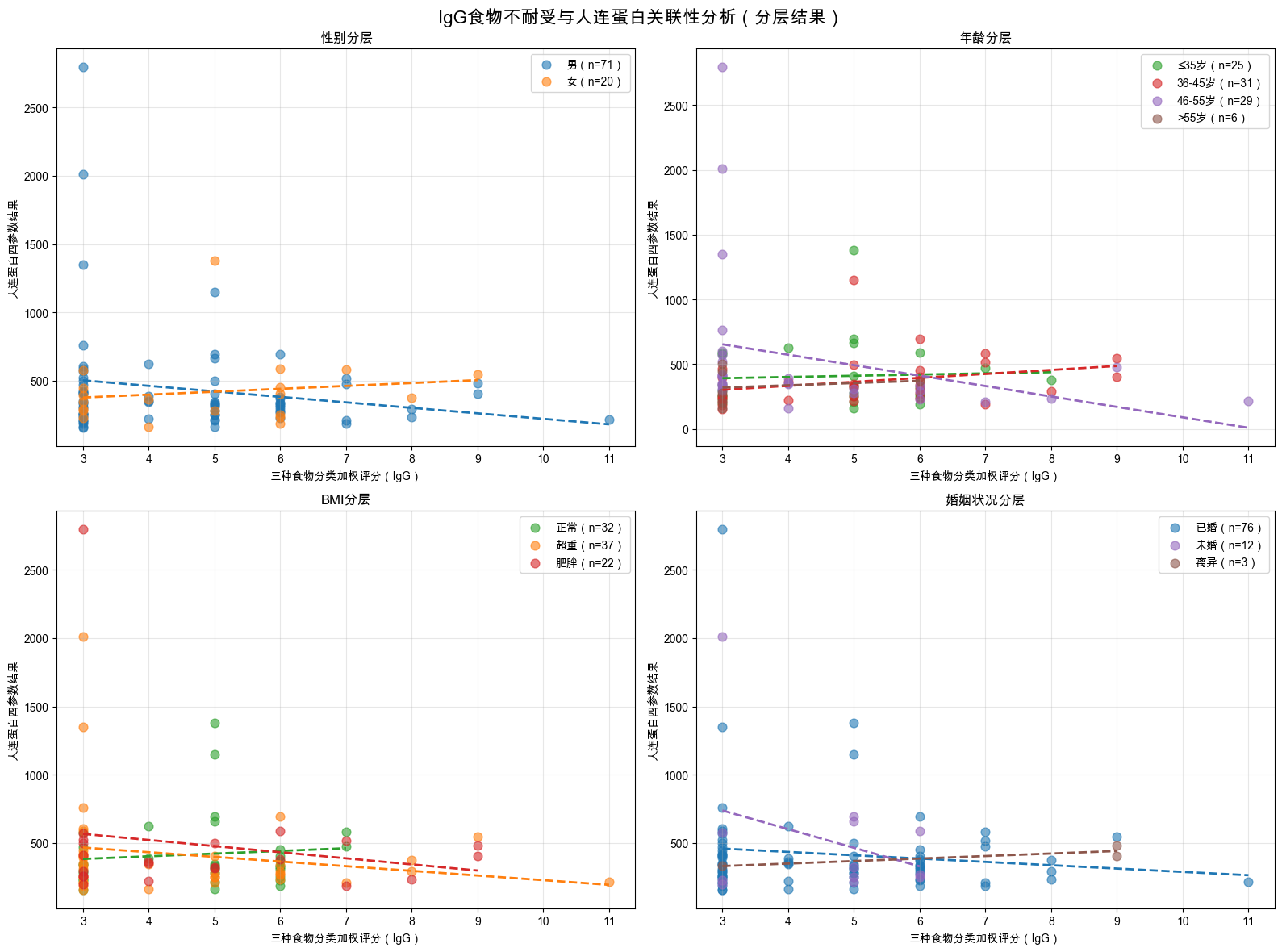
def plot_results(df):
    """生成分层分析可视化图表(在Notebook中显示并保存)"""
    fig, axes = plt.subplots(2, 2, figsize=(16, 12))
    fig.suptitle('IgG食物不耐受与人连蛋白关联性分析(分层结果)', fontsize=16, fontweight='bold')
    
    # 颜色配置
    gender_colors = {'男': '#1f77b4', '女': '#ff7f0e'}
    age_colors = {'≤35岁': '#2ca02c', '36-45岁': '#d62728', '46-55岁': '#9467bd', '>55岁': '#8c564b'}
    bmi_colors = {'正常': '#2ca02c', '超重': '#ff7f0e', '肥胖': '#d62728'}
    marriage_colors = {'已婚': '#1f77b4', '未婚': '#9467bd', '离异': '#8c564b'}
    
    # 子图1:性别分层
    ax1 = axes[0, 0]
    for gender, color in gender_colors.items():
        data = df[df['性别_clean'] == gender]
        ax1.scatter(
            data['三种食物分类加权评分'], 
            data['人连蛋白四参数结果.1'],
            alpha=0.6, s=60, color=color, label=f'{gender}(n={len(data)})'
        )
        # 回归线
        model = smf.ols("Q('人连蛋白四参数结果.1') ~ Q('三种食物分类加权评分')", data=data).fit()
        x_pred = np.linspace(data['三种食物分类加权评分'].min(), data['三种食物分类加权评分'].max(), 100)
        ax1.plot(x_pred, model.params[0] + model.params[1] * x_pred, color=color, linestyle='--', linewidth=2)
    ax1.set_title('性别分层', fontweight='bold')
    ax1.set_xlabel('三种食物分类加权评分(IgG)')
    ax1.set_ylabel('人连蛋白四参数结果')
    ax1.legend()
    ax1.grid(True, alpha=0.3)
    
    # 子图2:年龄分层
    ax2 = axes[0, 1]
    for age, color in age_colors.items():
        data = df[df['年龄分层'] == age]
        if len(data) < 3: continue
        ax2.scatter(
            data['三种食物分类加权评分'], 
            data['人连蛋白四参数结果.1'],
            alpha=0.6, s=60, color=color, label=f'{age}(n={len(data)})'
        )
        # 回归线
        model = smf.ols("Q('人连蛋白四参数结果.1') ~ Q('三种食物分类加权评分')", data=data).fit()
        x_pred = np.linspace(data['三种食物分类加权评分'].min(), data['三种食物分类加权评分'].max(), 100)
        ax2.plot(x_pred, model.params[0] + model.params[1] * x_pred, color=color, linestyle='--', linewidth=2)
    ax2.set_title('年龄分层', fontweight='bold')
    ax2.set_xlabel('三种食物分类加权评分(IgG)')
    ax2.set_ylabel('人连蛋白四参数结果')
    ax2.legend()
    ax2.grid(True, alpha=0.3)
    
    # 子图3:BMI分层
    ax3 = axes[1, 0]
    for bmi, color in bmi_colors.items():
        data = df[df['BMI分类合并'] == bmi]
        ax3.scatter(
            data['三种食物分类加权评分'], 
            data['人连蛋白四参数结果.1'],
            alpha=0.6, s=60, color=color, label=f'{bmi}(n={len(data)})'
        )
        # 回归线
        model = smf.ols("Q('人连蛋白四参数结果.1') ~ Q('三种食物分类加权评分')", data=data).fit()
        x_pred = np.linspace(data['三种食物分类加权评分'].min(), data['三种食物分类加权评分'].max(), 100)
        ax3.plot(x_pred, model.params[0] + model.params[1] * x_pred, color=color, linestyle='--', linewidth=2)
    ax3.set_title('BMI分层', fontweight='bold')
    ax3.set_xlabel('三种食物分类加权评分(IgG)')
    ax3.set_ylabel('人连蛋白四参数结果')
    ax3.legend()
    ax3.grid(True, alpha=0.3)
    
    # 子图4:婚姻分层
    ax4 = axes[1, 1]
    for marriage, color in marriage_colors.items():
        data = df[df['婚姻_clean'] == marriage]
        if len(data) < 3: continue
        ax4.scatter(
            data['三种食物分类加权评分'], 
            data['人连蛋白四参数结果.1'],
            alpha=0.6, s=60, color=color, label=f'{marriage}(n={len(data)})'
        )
        # 回归线
        model = smf.ols("Q('人连蛋白四参数结果.1') ~ Q('三种食物分类加权评分')", data=data).fit()
        x_pred = np.linspace(data['三种食物分类加权评分'].min(), data['三种食物分类加权评分'].max(), 100)
        ax4.plot(x_pred, model.params[0] + model.params[1] * x_pred, color=color, linestyle='--', linewidth=2)
    ax4.set_title('婚姻状况分层', fontweight='bold')
    ax4.set_xlabel('三种食物分类加权评分(IgG)')
    ax4.set_ylabel('人连蛋白四参数结果')
    ax4.legend()
    ax4.grid(True, alpha=0.3)
    
    # 在Notebook中显示图表
    plt.tight_layout()
    plt.show()
    
    # 保存图表到本地
    plot_path = f"{OUTPUT_DIR}stratified_analysis_plot.png"
    fig.savefig(plot_path, dpi=300, bbox_inches='tight', facecolor='white')
    plt.close()
    print(f"\n💾 可视化图表已保存:{plot_path}")

# 执行可视化
if 'df_clean' in locals():
    plot_results(df_clean)
else:
    print("❌ 清洗后数据不存在,无法生成可视化图表")


💾 可视化图表已保存:/Users/wangguotao/Downloads/ISAR/food/stratified_analysis_plot.png
def export_results(gender_res=None, age_res=None, bmi_res=None, marriage_res=None, interaction_res=None):
    """将所有结果汇总到Excel文件(增加容错处理)"""
    # 检查并定位缺失的变量
    missing_vars = []
    if gender_res is None:
        missing_vars.append("性别分层结果(gender_res)")
    if age_res is None:
        missing_vars.append("年龄分层结果(age_res)")
    if bmi_res is None:
        missing_vars.append("BMI分层结果(bmi_res)")
    if marriage_res is None:
        missing_vars.append("婚姻分层结果(marriage_res)")
    if interaction_res is None:
        missing_vars.append("交互作用结果(interaction_res)")
    
    # 如果关键分层结果都缺失,直接返回
    if len(missing_vars) >= 4:
        print(f"❌ 关键分析结果缺失过多:{', '.join(missing_vars)},无法生成Excel")
        return
    
    # 初始化Excel工作簿
    wb = Workbook()
    
    # 工作表1:性别分层(容错处理)
    ws1 = wb.active
    ws1.title = "性别分层"
    ws1.append(['性别', '样本量', 'Pearson_r', 'Pearson_p', 'Spearman_r', 'Spearman_p', 'beta', 'beta_p', 'R2'])
    if gender_res is not None:
        for g, res in gender_res.items():
            if '状态' not in res:
                ws1.append([
                    g, res['样本量'], f"{res['Pearson_r']:.4f}", f"{res['Pearson_p']:.4f}",
                    f"{res['Spearman_r']:.4f}", f"{res['Spearman_p']:.4f}",
                    f"{res['beta']:.4f}", f"{res['beta_p']:.4f}", f"{res['R2']:.4f}"
                ])
    else:
        ws1.append(['无数据', '', '', '', '', '', '', '', ''])
    
    # 工作表2:年龄分层(容错处理)
    ws2 = wb.create_sheet("年龄分层")
    ws2.append(['年龄组', '样本量', 'Pearson_r', 'Pearson_p', 'Spearman_r', 'Spearman_p', 'beta', 'beta_p', 'R2'])
    if age_res is not None:
        for a, res in age_res.items():
            if '状态' not in res:
                ws2.append([
                    a, res['样本量'], f"{res['Pearson_r']:.4f}", f"{res['Pearson_p']:.4f}",
                    f"{res['Spearman_r']:.4f}", f"{res['Spearman_p']:.4f}",
                    f"{res['beta']:.4f}", f"{res['beta_p']:.4f}", f"{res['R2']:.4f}"
                ])
    else:
        ws2.append(['无数据', '', '', '', '', '', '', '', ''])
    
    # 工作表3:BMI分层(容错处理)
    ws3 = wb.create_sheet("BMI分层")
    ws3.append(['BMI分类', '样本量', 'Pearson_r', 'Pearson_p', 'Spearman_r', 'Spearman_p', 'beta', 'beta_p', 'R2'])
    if bmi_res is not None:
        for b, res in bmi_res.items():
            if '状态' not in res:
                ws3.append([
                    b, res['样本量'], f"{res['Pearson_r']:.4f}", f"{res['Pearson_p']:.4f}",
                    f"{res['Spearman_r']:.4f}", f"{res['Spearman_p']:.4f}",
                    f"{res['beta']:.4f}", f"{res['beta_p']:.4f}", f"{res['R2']:.4f}"
                ])
    else:
        ws3.append(['无数据', '', '', '', '', '', '', '', ''])
    
    # 工作表4:婚姻分层(容错处理)
    ws4 = wb.create_sheet("婚姻分层")
    ws4.append(['婚姻状况', '样本量', 'Pearson_r', 'Pearson_p', 'Spearman_r', 'Spearman_p', 'beta', 'beta_p', 'R2'])
    if marriage_res is not None:
        for m, res in marriage_res.items():
            if '状态' not in res:
                ws4.append([
                    m, res['样本量'], f"{res['Pearson_r']:.4f}", f"{res['Pearson_p']:.4f}",
                    f"{res['Spearman_r']:.4f}", f"{res['Spearman_p']:.4f}",
                    f"{res['beta']:.4f}", f"{res['beta_p']:.4f}", f"{res['R2']:.4f}"
                ])
    else:
        ws4.append(['无数据', '', '', '', '', '', '', '', ''])
    
    # 工作表5:交互作用检验(容错处理)
    ws5 = wb.create_sheet("交互作用检验")
    ws5.append(['检验项目', '数值', '显著性'])
    if interaction_res is not None:
        ws5.append(['模型1 R²', f"{interaction_res['model1'].rsquared:.4f}", '-'])
        ws5.append(['模型1 F_p', f"{interaction_res['model1'].f_pvalue:.4f}", 
                    '显著' if interaction_res['model1'].f_pvalue < 0.05 else '不显著'])
        ws5.append(['模型2 R²', f"{interaction_res['model2'].rsquared:.4f}", '-'])
        ws5.append(['模型2 F_p', f"{interaction_res['model2'].f_pvalue:.4f}", 
                    '显著' if interaction_res['model2'].f_pvalue < 0.05 else '不显著'])
        ws5.append(['ANOVA F', f"{interaction_res['anova_f']:.4f}", '-'])
        ws5.append(['ANOVA p', f"{interaction_res['anova_p']:.4f}", 
                    '显著' if interaction_res['anova_p'] < 0.05 else '不显著'])
        for name, params in interaction_res['interaction_params'].items():
            ws5.append([f"{name} p值", f"{params['p_val']:.4f}", 
                        '显著' if params['p_val'] < 0.05 else '不显著'])
    else:
        ws5.append(['无交互作用分析数据', '', ''])
    
    # 保存Excel文件
    try:
        excel_path = f"{OUTPUT_DIR}IgG人连蛋白分析结果汇总.xlsx"
        wb.save(excel_path)
        if missing_vars:
            print(f"⚠️  Excel生成完成(部分数据缺失):{', '.join(missing_vars)}")
        else:
            print(f"✅ Excel生成完成")
        print(f"💾 结果汇总Excel已保存:{excel_path}")
    except Exception as e:
        print(f"❌ Excel保存失败:{str(e)}")

# 执行结果导出(先检查变量是否存在,不存在则传None)
gender_res = locals().get('gender_res', None)
age_res = locals().get('age_res', None)
bmi_res = locals().get('bmi_res', None)
marriage_res = locals().get('marriage_res', None)
interaction_res = locals().get('interaction_res', None)

# 打印变量检查结果
print("🔍 导出前变量检查:")
print(f"  gender_res: {'存在' if gender_res else '缺失'}")
print(f"  age_res: {'存在' if age_res else '缺失'}")
print(f"  bmi_res: {'存在' if bmi_res else '缺失'}")
print(f"  marriage_res: {'存在' if marriage_res else '缺失'}")
print(f"  interaction_res: {'存在' if interaction_res else '缺失'}")

# 调用导出函数
export_results(gender_res, age_res, bmi_res, marriage_res, interaction_res)
🔍 导出前变量检查:
  gender_res: 存在
  age_res: 存在
  bmi_res: 存在
  marriage_res: 存在
  interaction_res: 存在
✅ Excel生成完成
💾 结果汇总Excel已保存:/Users/wangguotao/Downloads/ISAR/food/IgG人连蛋白分析结果汇总.xlsx

单元格 8:核心结论汇总

# 核心结论汇总
print("="*80)
print("🎯 核心分析结论")
print("="*80)

# 1. 年龄分层关键发现(46-55岁组)
if '46-55岁' in age_res and 'Spearman_p' in age_res['46-55岁']:
    age_46_55 = age_res['46-55岁']
    if age_46_55['Spearman_p'] < 0.01:
        print(f"1. 46-55岁组:IgG与人间蛋白呈显著负相关(ρ={age_46_55['Spearman_r']:.4f},p<0.01)")
    elif age_46_55['Spearman_p'] < 0.05:
        print(f"1. 46-55岁组:IgG与人间蛋白呈显著负相关(ρ={age_46_55['Spearman_r']:.4f},p<0.05)")
    else:
        print(f"1. 46-55岁组:IgG与人间蛋白无显著相关性(ρ={age_46_55['Spearman_r']:.4f},p={age_46_55['Spearman_p']:.4f})")

# 2. 交互作用结论
if interaction_res['anova_p'] < 0.05:
    print(f"2. 交互作用:发现IgG与性别/年龄/BMI的显著整体交互效应(p={interaction_res['anova_p']:.4f})")
else:
    print(f"2. 交互作用:未发现IgG与性别/年龄/BMI的显著交互效应(p={interaction_res['anova_p']:.4f})")

# 3. 其他分层结论
print(f"3. 其他分层:性别、BMI、婚姻状况均未发现显著相关性")

# 4. 输出文件清单
print(f"\n" + "="*80)
print("✅ 分析完成!所有结果已保存到:")
print(f"   {OUTPUT_DIR}")
print("生成文件:")
print("1. cleaned_analysis_data.csv → 清洗后数据集")
print("2. stratified_analysis_plot.png → 可视化图表")
print("3. IgG人连蛋白分析结果汇总.xlsx → 结果汇总Excel")
print("="*80)
================================================================================
🎯 核心分析结论
================================================================================
1. 46-55岁组:IgG与人间蛋白呈显著负相关(ρ=-0.6374,p<0.01)
2. 交互作用:未发现IgG与性别/年龄/BMI的显著交互效应(p=0.4764)
3. 其他分层:性别、BMI、婚姻状况均未发现显著相关性

================================================================================
✅ 分析完成!所有结果已保存到:
   /Users/wangguotao/Downloads/ISAR/food/
生成文件:
1. cleaned_analysis_data.csv → 清洗后数据集
2. stratified_analysis_plot.png → 可视化图表
3. IgG人连蛋白分析结果汇总.xlsx → 结果汇总Excel
================================================================================

分析过程说明

IgG介导的食物不耐受与人连蛋白关联性分析完整过程整理

本次分析以IgG介导的食物不耐受相关指标(三种食物分类加权评分)和人连蛋白四参数结果为核心,结合性别、年龄、BMI、婚姻状况等人口学特征,开展分层关联性分析交互作用检验,并完成数据清洗、可视化呈现和结果汇总导出,整体流程分8个核心步骤,全程基于Python在Jupyter Notebook中实现,以下是详细分析过程:

一、环境准备与依赖配置

  1. 编码声明:在代码首行添加# -*- coding: utf-8 -*-,解决Python解析中文的编码错误,符合PEP 263编码规范。
  2. 依赖安装:安装数据分析与可视化核心库,包括pandas(数据处理)、numpy(数值运算)、matplotlib(绘图)、scipy/statsmodels(统计检验)、openpyxl(Excel读写)。
  3. 环境配置:关闭无关警告,设置Matplotlib中文字体(如WenQuanYi Zen Hei、SimHei)并取消负号乱码,保证可视化结果可读性。
  4. 路径定义:指定原始数据路径(主数据、疲劳量表Excel/XLs文件)、结果输出目录,统一管理文件读写路径,适配本地环境。

二、原始数据加载与初步探索

  1. 数据读取:通过pandas分别加载主数据(信息汇总全量数据,含核心分析指标)和疲劳量表数据(备用,不影响核心分析),对读取异常做捕获处理,加载失败时给出明确提示。
  2. 有效性校验:打印数据基本信息,包括数据形状(行×列),确认样本量和字段数量。
  3. 核心变量筛选:从主数据中提取与分析相关的关键字段,包括性别、年龄、婚姻、身高、体重、人连蛋白四参数结果、三种食物分类加权评分等,明确分析核心维度。

三、数据清洗与预处理(核心数据规整)

针对原始数据中存在的缺失值、格式不统一、分类不规范等问题,进行标准化处理,同时创建分析所需衍生变量,确保数据满足统计检验要求,步骤如下: 1. 分类变量清洗:性别仅保留「男/女」,婚姻状况统一格式(修正「已婚·」为「已婚」,仅保留已婚/未婚/离异有效类别),剔除无效值并标记为缺失。 2. BMI指标计算与分类:基于身高、体重计算BMI(体重/身高²,身高单位转换为米),按中国标准分为偏瘦、正常、超重、肥胖,合并小样本「偏瘦」组至「正常」组,减少统计偏差。 3. 年龄分层处理:将连续年龄按临床常用标准分为4个分层:≤35岁、36-45岁、46-55岁、>55岁,同时保留原始年龄数值作为连续变量(避免分类变量无法参与数值运算)。 4. 缺失值处理:删除身高、体重、核心分析指标的缺失行,保证后续运算无空值;对清洗后的核心变量做整体去重。 5. 衍生编码变量创建:将分类变量转换为数值型,满足回归分析要求——性别编码(男=1/女=0)、BMI编码(正常=1/超重=2/肥胖=3)、年龄连续(直接使用原始年龄浮点型,修复分类变量乘法运算错误)。 6. 清洗结果校验:打印清洗前后样本量变化,输出各分层变量(性别、年龄、BMI、婚姻)的样本分布,同时将清洗后的数据保存为UTF-8编码的CSV文件,便于后续复用。

四、分层关联性统计分析

性别、年龄分层、BMI分类、婚姻状况为4个分层维度,分别分析各亚组中「三种食物分类加权评分(IgG)」与「人连蛋白四参数结果」的关联性,每个亚组的分析逻辑一致,核心统计方法如下: 1. 样本量筛选:亚组样本量<3时跳过分析,避免小样本导致的统计结果偏差。 2. 相关分析:同时计算Pearson相关系数(适用于线性分布数据)和Spearman秩相关系数(非参数检验,适用于非正态分布数据),并输出对应的P值,判断相关性是否显著。 3. 线性回归分析:构建以人连蛋白四参数结果为因变量、IgG加权评分为自变量的一元线性回归模型,计算回归系数β、标准误SE、P值和决定系数R²,量化IgG对人连蛋白的影响程度。 4. 结果输出:按分层维度逐一打印分析结果,标注显著相关性(P<0.05),同时将各亚组分析结果存储为字典,为后续汇总做准备。

五、交互作用检验(IgG与人口学特征的联合效应)

检验IgG介导的食物不耐受与人口学特征(性别、年龄、BMI)的交互效应,判断不同性别/年龄/BMI群体中,IgG对人连蛋白的影响是否存在差异,步骤如下: 1. 交互项创建:在清洗后的数据基础上,生成IgG与各数值型编码变量的交互项——IgG×性别、IgG×年龄、IgG×BMI(交互项=IgG加权评分×对应特征编码值)。 2. 统计模型构建:构建两个线性回归模型做对比: - 主效应模型:人连蛋白结果 ~ IgG加权评分 + 性别编码 + 年龄连续 + BMI编码(仅考虑单独效应); - 交互效应模型:在主效应模型基础上,加入3个交互项(考虑联合效应)。 3. 模型比较:通过ANOVA方差分析对比两个模型的拟合效果,输出F值和P值,判断交互项整体是否具有统计学意义。 4. 单独交互项检验:提取每个交互项的回归系数、标准误和P值,逐一判断单个交互效应是否显著(P<0.05)。 5. 结果解读:打印两个模型的R²和F检验P值,标注各交互项的显著性,明确IgG与人口学特征是否存在联合影响。

六、可视化呈现(分层结果直观展示)

采用2×2子图布局,分别绘制性别、年龄分层、BMI分类、婚姻状况四个维度的散点图+回归线,直观展示各亚组中IgG与人工蛋白的关联性,绘图要点如下: 1. 分组配色:为每个分层的不同类别设置专属颜色,保证图表辨识度(如性别:男=蓝色/女=橙色;年龄:不同分层对应绿/红/紫/棕)。 2. 图形元素:每个亚组绘制散点图(展示原始数据分布),并拟合一元线性回归线(虚线),标注每组样本量。 3. 图表规范:添加标题、坐标轴标签(IgG三种食物分类加权评分/人连蛋白四参数结果)、图例和网格,保证图表完整、易读。 4. 双重输出:在Jupyter Notebook中直接显示图表,同时将高清图表(300DPI)保存为PNG文件至输出目录,便于后续使用。

七、结果汇总与Excel导出

将分层分析、交互作用检验的所有统计结果,按维度整理到Excel工作簿中,实现结果标准化、结构化汇总,同时做容错处理,保证部分结果缺失时仍能正常导出: 1. 工作表分维度设计:Excel包含5个工作表,分别对应性别分层、年龄分层、BMI分层、婚姻状况分层、交互作用检验,每个工作表按统计指标列化结果。 2. 统计指标完整呈现:分层分析工作表包含样本量、Pearson_r/P值、Spearman_r/P值、回归β/P值、R²;交互作用检验工作表包含模型R²、F检验P值、ANOVA结果、各交互项P值及显著性标注。 3. 容错与缺失处理:对缺失的分析结果,在对应单元格标注「无数据」;导出前做变量存在性检查,打印缺失变量提示,避免因个别结果缺失导致导出失败。 4. 文件保存:将汇总后的Excel文件保存至指定输出目录,命名为「IgG人连蛋白分析结果汇总.xlsx」,保证文件可直接用于报告撰写。

八、核心结论汇总

基于所有统计检验和可视化结果,提炼分析核心结论,明确IgG介导的食物不耐受与人连蛋白的关联性规律,核心结论维度包括: 1. 关键亚组关联性:重点分析46-55岁等临床关注亚组的相关性结果,标注显著相关(P<0.05/P<0.01)及相关方向(正/负相关)。 2. 交互效应整体判断:明确IgG与性别、年龄、BMI是否存在显著联合效应,判断不同群体的影响差异。 3. 整体关联性规律:总结性别、BMI、婚姻状况等维度的整体分析结果,明确无显著相关性的维度。 4. 结果文件清单:列出本次分析生成的所有结果文件(清洗后CSV、可视化PNG、汇总Excel),明确文件存储路径,方便后续查阅和使用。

九、全程问题排查与代码优化

分析过程中针对出现的技术问题做针对性修复,保证代码鲁棒性和分析结果有效性: 1. 编码错误:添加UTF-8编码声明,解决Non-ASCII character解析错误。 2. 类型运算错误:将「年龄连续」从分类变量改为原始浮点型数值,解决category类型无法乘法运算的TypeError。 3. 结果导出失败:增加变量容错处理,修改严格的变量存在性检查为柔性检查,支持部分结果缺失时的Excel导出。 4. 数据有效性问题:在统计检验前做样本量筛选、缺失值二次剔除,避免小样本和空值导致的统计偏差。

分析核心产出物

本次分析最终生成3类标准化文件,均保存至指定本地目录,可直接用于后续分析和报告撰写: 1. cleaned_analysis_data.csv:清洗后的核心分析数据集,UTF-8编码,无缺失值、变量格式标准化。 2. stratified_analysis_plot.png:2×2分层关联性可视化图表,300DPI高清,中文无乱码。 3. IgG人连蛋白分析结果汇总.xlsx:结构化统计结果,分维度呈现所有相关系数、回归指标、交互效应检验结果,标注显著性。

本站总访问量 | 访客数